ICaaS / Code As Service (CAS)
Overview
Code As Service (CAS) provides reusable Terraform-based Infrastructure as Code for client teams, enabling standardized, compliant, and secure Azure infrastructure deployments without recreating infrastructure patterns for each project. The capability separates shared infrastructure code from client-specific configurations and supports automated deployments through GitHub Actions.
Architecture Diagrams
The Code As Service (CAS) capability within ICaaS provides reusable, standardized, and Terraform-based Infrastructure as Code for Azure environments. It enables client teams to provision infrastructure using pre-built and centrally managed modules rather than creating infrastructure from scratch for each project. The capability promotes consistency, security, automation, and compliance by providing common infrastructure patterns and deployment standards while allowing clients to manage environment-specific configurations through their own repositories. Deployments are automated through GitHub Actions, with secrets managed securely through GitHub Secrets and infrastructure configurations maintained separately from shared infrastructure code. The service supports common Azure infrastructure components including networking, storage, application hosting, databases, caching, data integration, and private connectivity services, enabling teams to accelerate environment provisioning, standardize deployments, reduce duplication, and leverage a common set of infrastructure modules maintained by the Tier0 platform team.
Approach
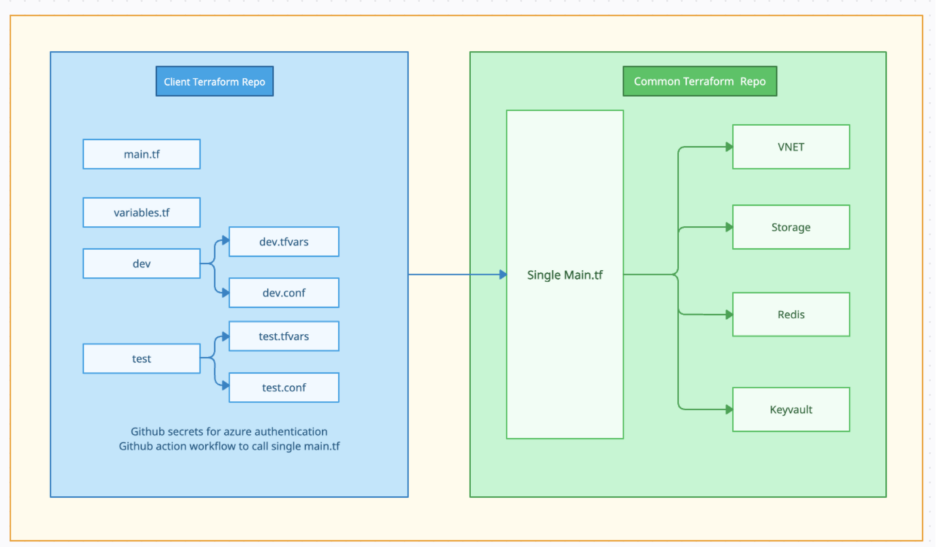
Single Main.tf
In this approach, client calls the common infra repo and mentions the resources needed by defining them in main module configuration. The configuration of resources is defined in tfvars of respective environments. The infrastructure creation happens through GitHub Actions by setting their environments in input variables of workflow. The configurational secrets are stored in GitHub repo.
Direct Module
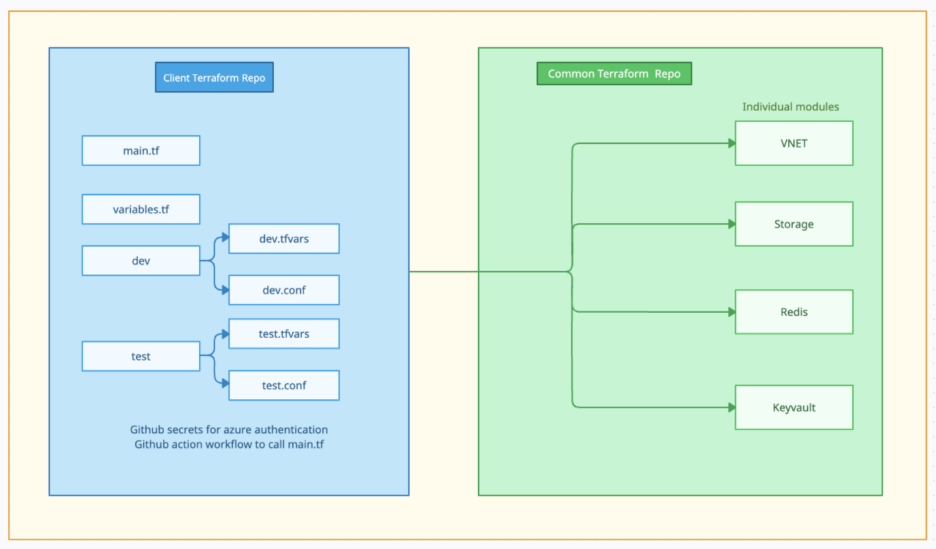
In this approach, client calls the individual modules using source variable and mentions the resources needed by defining them in main module configuration. The configuration of resources is defined in tfvars of respective environments. The infrastructure creation happens through GitHub Actions by setting their environments in input variables of workflow. The configurational secrets are stored in GitHub repo.
Purpose
Provide a modular, reusable, and standardized approach for provisioning foundational Azure infrastructure such as Virtual Networks, Storage Accounts, App Services, Redis, and Key Vault using Terraform while supporting consistent environment management.
Key Capabilities
- Standardized infrastructure deployment across teams and environments.
- Reusable Terraform modules maintained in a common repository.
- Separation of shared infrastructure code and client-specific configuration.
- Environment-specific deployments using tfvars files.
- GitHub Actions based deployment automation.
- Secure secret management through GitHub Secrets.
- Infrastructure deployment aligned with compliance and security requirements.
- Support for common Azure infrastructure services and networking components.
Common Infrastructure Components
- Storage Accounts
- Redis
- App Services
- Azure Data Factory
- Container Registry
- Event Hubs
- Logic Apps
- MSSQL Servers
- Virtual Networks
- Subnets
- Private Endpoints
- Automated Naming Utilities
Client Repository Model
Each client maintains its own repository containing Terraform configurations, environment-specific tfvars files, GitHub workflows, and deployment settings. Sensitive information is managed through GitHub Secrets, while deployments are automated using GitHub Actions.
Supported Consumption Approaches
Single Main.tf: Clients consume a centralized orchestration layer and define required resources through configuration files. Infrastructure deployments are executed through GitHub Actions using environment-specific settings.
Direct Module: Clients directly consume individual Terraform modules and select only the required infrastructure components. Deployments continue to be managed through GitHub Actions and environment-specific configurations.