Azure License Request and Provisioning (OptumSGS)
Scope
The scope includes Azure and Azure-connected licensing flows, including Entra and Power Platform license handling. It covers request intake, approvals, procurement, group creation, license assignment governance, operational ownership, monitoring, and audit data capture. Non-Azure tool licensing processes are out of scope.
Goals, Requirements, Assumptions, Constraints and Risks
| Category | Description |
|---|---|
| Goals | Ensure licenses are assigned only to approved users, reduce cost leakage, enforce least privilege, and maintain audit-ready evidence for every license assignment. |
| Requirements | All access must be group based, request driven, approved by designated owners, periodically reviewed, and removed when no longer required. |
| Assumptions | Users exist in Entra ID, license groups can be mapped to application roles, and application owners can provide business approval for access. |
| Constraints | Some SaaS platforms may allocate licenses automatically at first successful login unless domain verification, SSO, provisioning, and access controls are designed carefully. |
| Risks | Uncontrolled login access may result in license consumption, unauthorized landing-page access, audit gaps, and increased operational cost. |
License Provisioning Flow
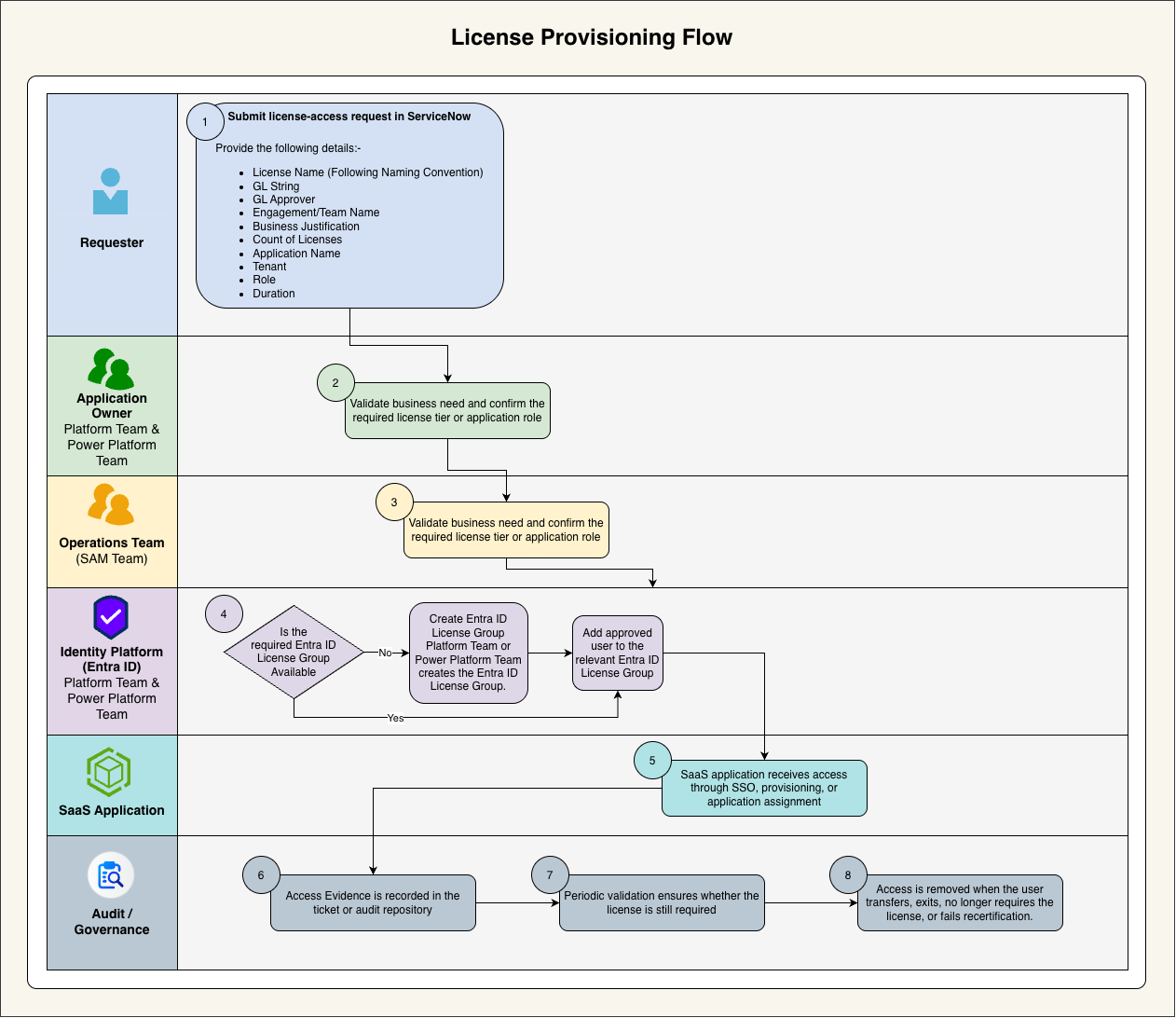
-
Requester submits a license-access request in Service Now with the following details:
- License Name (follow naming convention)
- GL String
- GL Approver
- Engagement/Team Name
- Business justification
- Count of Licenses
- Application name
- Tenant
- Role
- Duration
- Application owner validates the business need and confirms the required license tier or application role.
- Operations team validates license requirements and confirms license provisioning.
- Approved user is added to the relevant Entra ID license group.
- SaaS application receives access through SSO, provisioning, or application assignment.
- Access evidence is recorded in the ticket or audit repository.
- Periodic review validates whether the license is still required.
- Access is removed when the user transfers, exits, no longer requires the license, or fails recertification.
Request Intake Model
When a license is needed, the requester must raise a ticket to the license intake mail group. The ticket distribution should include the Architect team, SAM team, and Jack team members so that architecture review, software asset management validation, and Entra ownership actions can be coordinated from the beginning.
OCC, SGS and any other client cloud managed by SGS Team.
Components
| Component | Purpose |
|---|---|
| Entra ID | Central identity platform for authentication, user lifecycle, security groups, enterprise application assignment, and conditional access integration. |
| Security Groups | Primary mechanism used to control membership for license assignment and application access. |
| SaaS Application | Target licensed platform such as Jira, I-CASS, OpenIAM SaaS, or other enterprise applications. |
| Access Request Channel | Ticketing or approval workflow used to capture requester details, business justification, approver, license type, and target tenant. |
| Application Owner | Business or platform owner responsible for approving access and validating ongoing license need. |
| Operations Team | Team responsible for implementing approved group membership changes and maintaining evidence. |
| Audit Repository | Location where approvals, access changes, reviews, and exception records are retained. |
Governance Controls
| Control Area | Required Control |
|---|---|
| Access Restriction | Only approved users in designated Entra ID groups should be able to access the licensed application. |
| License Consumption | Login-based auto-license allocation should be avoided unless the user is explicitly approved and assigned. |
| Approvals | Every license assignment must have an approved request with business justification and owner approval. |
| Segregation | Administration, approval, and usage roles should remain separate where practical. |
| Review | License groups should be reviewed on a defined cadence to remove unused or stale access. |
| Evidence | Tickets, approvals, group membership logs, and review results should be retained for audit purposes. |
Roles and Responsibilities
| Role | Responsibility |
|---|---|
| Requester | Submits accurate access details and confirms business justification. |
| Manager | Validates that the user requires the license for current responsibilities. |
| Application Owner | Approves application access and confirms the correct license tier or role. |
| Identity Operations | Maintains Entra ID groups, performs group membership changes, and captures evidence. |
| Security or Compliance Team | Reviews control effectiveness, validates audit evidence, and monitors exceptions. |
| Platform Owner | Owns the overall design, standards, and operational readiness of the license governance model. |
Group Naming Standard
License groups should follow a consistent naming standard so that ownership, tenant, application, role, and environment can be identified without manual interpretation.
Recommended pattern:
AZU_<<TenantName>>_[<<Clientname>>|<<EngagementName>>|<<OtherToSegregate>>]_<<LicenseName>>_<<Count>>_License
Example:
AZU_SGS_MALTSS_PowerAutomate_2_License
Exception Handling
Exceptions must be time-bound, approved by the application owner and security or compliance representative, and recorded with justification. Emergency access should include start time, end time, approver, access scope, and post-access review evidence.
Audit and Reporting Requirements
- Approved access request or ticket number
- Application name, tenant, license tier, and assigned group
- User identity and manager or application-owner approval
- Date and time of provisioning and deprovisioning
- Evidence of periodic access review
- Exception approval and expiry date, if applicable
Appendix A - Acronyms
| Acronym | Term |
|---|---|
| SSO | Single Sign-On |
| SaaS | Software as a Service |
| IAM | Identity and Access Management |
| RBAC | Role-Based Access Control |
| LIC | License |
Appendix B - License Abbreviations
| Tab Name (License) | Abbreviation |
|---|---|
| Microsoft 365 E3 | M365E3 |
| Microsoft 365 E5 | M365E5 |
| Microsoft Copilot Studio Viral | CopilotStudioViral |
| Microsoft Defender Suite | DefenderSuite |
| Microsoft Entra ID Governance | EntraIDGov |
| Microsoft Entra ID P2 | EntraIDP2 |
| Microsoft Fabric (Free) | FabricFree |
| Microsoft Power Apps for Developers | PowerAppsDev |
| Microsoft Power Automate Free | PowerAutomateFree |
| Microsoft Teams Exploratory | TeamsExploratory |
| Microsoft Purview Suite | PurviewSuite |
| Power Apps Premium | PowerAppsPremium |
| Power Automate Premium | PowerAutomatePremium |
| Power BI Premium Per Use | PowerBIPremiumPU |