Centralized logging
Overview
Detailed Description
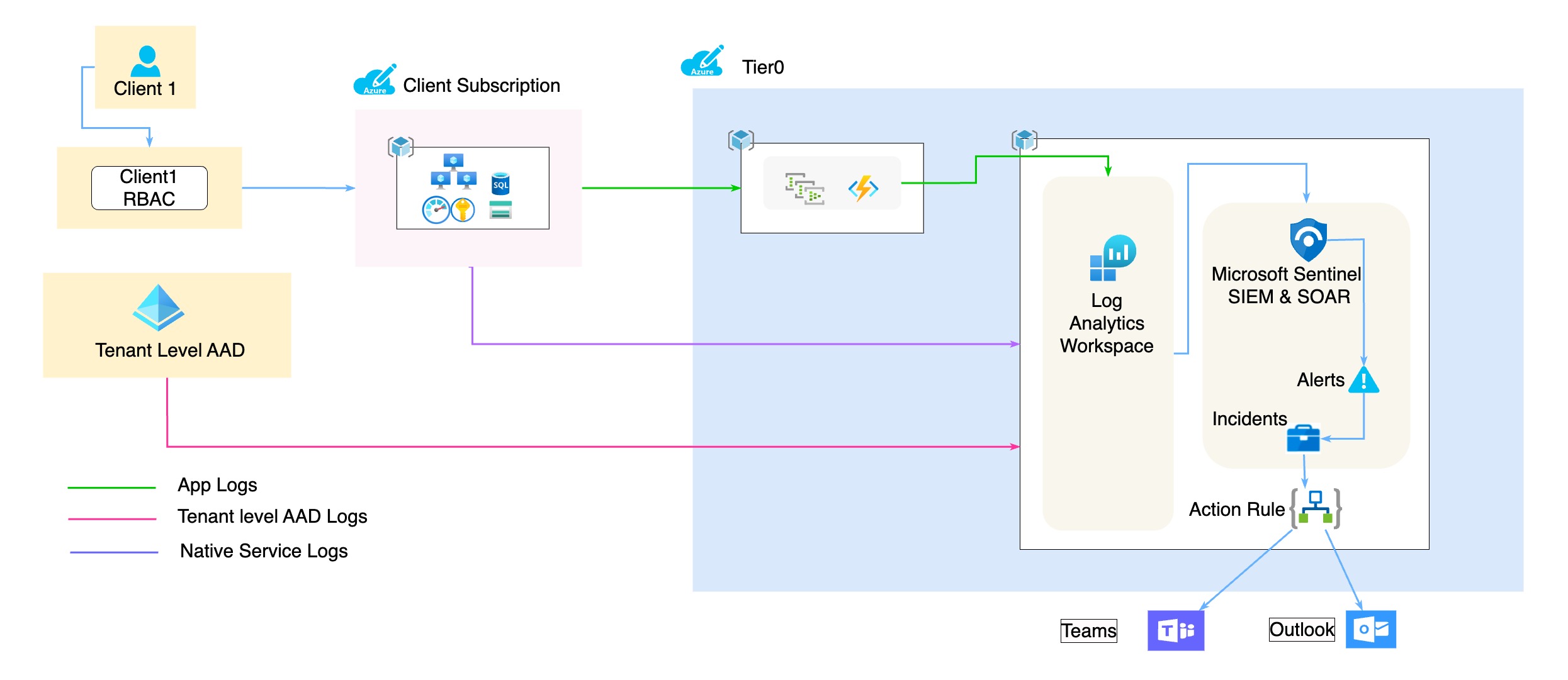
It facilitates the management of various log formats:
| Log Category | Details Regarding | Source | Destination |
|---|---|---|---|
| AAD Logs | User sign-in activities and system activity information about users and group management. | AAD | Log Analytics Workspace |
| Resource Logs 1. Audit Logs 2. Firewall logs |
Operations that were performed within an Azure resource (the data plane). Examples might be getting a secret from a key vault or making a request to a database. | Azure Resources | Event Hub to Log Analytics Workspace |
| Activity Logs (Role change logs) | Operations on each Azure resource in the subscription from the outside (the management plane) and updates on Service Health events. There's a single activity log for each Azure subscription. | Azure Resources | Event Hub to Log Analytics Workspace |
| Details Regarding | Source | Destination |
|---|---|---|
| Syslogs and data about the operating system on compute resources. | 1. Azure diagnostic extension 2. Log Analytics agent 3. VM insights |
VM (host os) |
For more details, go to the detailed implementation document of the VM logs:
- VM Logs Centralized Logging
| Details Regarding | Source | Destination |
|---|---|---|
| IP traffic flowing through an NSG. | NSG | Storage Account |
| Log Category | Details Regarding | Source | Destination |
|---|---|---|---|
| Processed Logs | To Provides security information and alerts from Azure Defender and Monitor. | Defender Alerts | via Event Hub to Log Analytics Workspace |
| Third Party Logs (Open IAM, MongoDB) | To provide insight into security logs of running instances. | OpenIAM, MongoDB |
| Log Category | Details Regarding | Source | Destination |
|---|---|---|---|
| Application log 1. Ness logs 2. Regular App logs |
Application security logs. | Application | Event Hub to Log Analytics Workspace |
| AppInsights (Performance, TLS/SSL Certificate logs) | Application perfomance and proactive lifetime check of SSL Cert, from 1 day to 365 days. | Application logs on AppInsights | Log Analytics Workspace |
- Function App Logs
For more details, go to the detailed analysis document of the function app logs:
- Analysis of Function App Logs
| Details Regarding | Source | Destination |
|---|---|---|
| Logs emitted by the Functions host and by customer code. | Azure Function Apps | Log Analytics Workspace |
- Logic App Logs
For more details, go to the detailed analysis document of the logic app logs:
- Analysis on the Logs of Logic Apps
| Details Regarding | Source | Destination |
|---|---|---|
| Workflow runtime logs with step-by-step run status of each action. | Azure Logic Apps | Log Analytics Workspace |
- Storage Account Logs
For more details, go to the detailed analysis document of the storage account logs:
- Analysis on the Logs of Storage Accounts
| Details Regarding | Source | Destination |
|---|---|---|
| Data plane diagnostic logs of the storage services. | Blob, Queue, Table, File | Log Analytics Workspace |
- App Service Logs
For more details, go to the detailed POC document of the app service logs:
- Logging POC for Azure App Services
| Details Regarding | Source | Destination |
|---|---|---|
| Application and console logs of the hosted app services. | Function Apps, Logic Apps, Web Apps | Log Analytics Workspace |
- Database Logs
For more details, go to the detailed implementation document of each of the database logs:
- MSSQL
- MySQL
| Details Regarding | Source | Destination |
|---|---|---|
| Audit Logs of various kinds of databases | MSSQL,MySQL,PostgreSQL | Log Analytics Workspace |
Log types with respective LAW table names
| Tables | Log Type |
|---|---|
| AzureDiagnostics | Diagnostics logs |
| Application logs | |
| AzureActivity | Activity logs |
| VM logs | |
| SecurityEvent | Defender logs |
| AAD logs | |
| Netflow logs | |
| FunctionAppLogs | Function app logs |
| LogicAppWorkflowRuntime | Logic app workflow runtime logs |
| StorageBlobLogs StorageQueueLogs StorageTableLogs StorageFileLogs |
Storage account logs |
| AppServiceConsoleLogs | App service application and console logs |
Benefits and Business Case
- Insufficient visibility
- Restricted troubleshooting capacities
- Compliance and security concerns
To address these concers and more, CL offers a variety of usage scenarios such as:
- Security and Compliance
- Application Visibility
- Business Intelligence
Responsibilities
Initial Setup
- Client has to submit the required information for the initial setup. Please fill the onboarding form and follow the section for more details.
- Explore Dummy app
- Explore Ness logging
- Explore FluentD integration with AKS
- Explore FluentD integration with VM
Once the client setup and handover is complete the responsibilities are defined as below -
Tier0
- The logs should be collected as expected.
- Handle any setup or connectivity related issues.
Client
- Setup of resources and services.